🛡️
Sicherheitsschicht – Sandbox & Angriffsschutz
Security Layer – Sandbox & Attack Protection
Mehrstufige Absicherung des KI-Agenten: Sandbox-Isolation führt Aktionen von Netzwerk-Benutzern unprivilegiert und vom System getrennt aus – ohne Zugriff auf geschützte System- und Konfigurationsbereiche. Rollenbasierte Rechte- und Dateisystem-Trennung zwischen Administratoren und Netzwerk-Benutzern. Erkennung von Jailbreak-, Prompt-Injection- und verschleierten (Base64-)Angriffen in Echtzeit über Chat, Support und WhatsApp (Heuristik + LLM-Klassifikator). Bei wiederholten Angriffsversuchen wird das Konto automatisch gesperrt; alle sicherheitsrelevanten Zugriffe werden protokolliert. Alle Netzwerk-Benutzer teilen sich einen Systembenutzer – deshalb bekommt jeder sein eigenes Arbeitsverzeichnis, das im Lauf als /tmp eingehängt wird: fremde Zwischendateien sind nicht etwa unlesbar, sie sind nicht vorhanden, und fremde Prozesse sind unsichtbar. Freischalten und Konfiguration unter Einstellungen → Sicherheit.
Multi-layered protection for the AI agent: sandbox isolation runs network users' actions unprivileged and separated from the system – with no access to protected system and configuration areas. Role-based rights and file-system separation between administrators and network users. Real-time detection of jailbreak, prompt-injection and obfuscated (Base64) attacks across chat, support and WhatsApp (heuristics + LLM classifier). Repeated attack attempts lock the account automatically; all security-relevant access is logged. All network users share one system account – so each of them gets their own working directory, mounted as /tmp for the duration of a run: another user's intermediate files are not merely unreadable, they are not there, and foreign processes are invisible. Unlocking and configuration under Settings → Security.
NeuNew
🎫
Jira im Browser – Zusammenfassung und Antwortentwurf am Ticket
Jira in the Browser – Summary and Draft Reply at the Ticket
Eine Browser-Erweiterung für Chrome, Edge und Firefox, die als Seitenleiste neben dem offenen Vorgang steht: Sie fasst das Ticket zusammen oder formuliert einen Antwortentwurf an den Melder – gesteuert über benannte Vorlagen, die jeder selbst anlegt und die eine Art tragen (Zusammenfassung oder Antwort). Auch andersherum: den Text, den du selbst ins Kommentarfeld geschrieben hast, gleicht sie mit dem Ticketverlauf ab und gibt ihn korrigiert zurück – Widersprüche stehen als Hinweis daneben und gehen nicht mit. Jeder arbeitet mit seinem eigenen Jira-Token, sieht also genau die Vorgänge, für die er freigegeben ist. Geschrieben wird nichts: der Entwurf landet im Kommentarfeld, abgeschickt wird in Jira von Hand. Nachschlagen in Wissensdatenbank und Fachsystemen ist möglich – nur lesend, nur wenn ein Administrator den Bereich freigegeben hat und nur, wo es in der Vorlage angehakt ist.
A browser extension for Chrome, Edge and Firefox that sits as a side panel next to the open issue: it summarises the ticket or drafts a reply to the reporter – driven by named templates that every user creates for themselves, each carrying a kind (summary or reply). It also works the other way round: the text you wrote into the comment box is checked against the issue history and handed back corrected – contradictions appear as a note beside it and are not included. Everyone works with their own Jira token, so they see exactly the issues they are entitled to. Nothing is written: the draft goes into the comment box, sending happens in Jira, by hand. Looking things up in the knowledge base and internal business systems is possible – read-only, only if an administrator has released the area, and only where a template ticks it.
NeuNew
🗂️
VEMAS.NET-Auswertungen
VEMAS.NET Analyses
Anbindung an VEMAS.NET, die Lösung für das Projekt- und Dienstleistungsgeschäft: 21 vorbereitete Abfragen in sieben Kategorien – Cockpit für die Geschäftsführung, CRM, Projekte, Zeiten, Hotline, Abrechnung und Lastplan – dazu freie Fragen und eine Abfrage-Konsole ohne KI. Nur-Lesen ist die Vorgabe. Schreiben lässt sich freischalten, läuft dann aber ausschließlich über den persönlichen Zugang des Benutzers: im Fremdsystem soll der richtige Name im Protokoll stehen und nicht der eines Sammelkontos. Gelöscht wird nie, auch nach der Freigabe nicht. Wie bei SAP hinterlegt jeder seinen eigenen Zugang; der gemeinsame ist nur der Rückfall – und dass er einspringt, sagt die Oberfläche.
Connects to VEMAS.NET, the platform for project and professional-services businesses: 21 prepared queries across seven categories – management cockpit, CRM, projects, time tracking, service desk, billing and capacity planning – plus free-form questions and an AI-free query console. Read-only is the default. Writing can be enabled, but then runs exclusively through the user's personal account: the remote system's audit trail should carry the right name, not a shared one. Nothing is ever deleted, not even once writing is enabled. As with SAP, everyone stores their own credentials; the shared account is only the fallback – and the UI says when it steps in.
NeuNew
🎯
Kurzwege – Ablagen mit gespeichertem Auftrag
Short Tracks – Drop Zones with a Stored Task
Ein Brett aus benannten Ablagen, jede mit einem einmal formulierten Auftrag. Datei oder Link darauf ziehen – der Auftrag läuft, das Ergebnis steht auf der Karte, erzeugte Dateien liegen als Download bereit. Für wiederkehrende Dokumentarbeit, die man sonst jedes Mal neu erklärt: „Rechnung prüfen“, „Angebot zusammenfassen“, „Tabelle bereinigen“. Ein Administrator legt Ablagen für alle an, jeder Benutzer zusätzlich eigene. Ein Lauf trägt immer die Kennung dessen, der etwas abgelegt hat, ist immer unprivilegiert und bekommt nur die Werkzeug-Bereiche, die ein Administrator freigegeben hat. Mehrere Aufträge laufen in einer Warteschlange; wie viele gleichzeitig, entscheidet der Administrator.
A board of named drop zones, each carrying a task you formulate once. Drag a file or a link onto it – the task runs, the result appears on the card, generated files are ready to download. Made for recurring document work you would otherwise re-explain every time: “check this invoice”, “summarise this quote”, “clean up this table”. An administrator creates zones for everyone, every user creates their own on top. A run always carries the identity of whoever dropped something, is always unprivileged, and only gets the tool areas an administrator has approved. Multiple jobs run through a queue; the administrator decides how many at once.
NeuNew
📊
Excel-Add-in – Chatfenster auf der offenen Mappe
Excel Add-in – A Chat Window on the Open Workbook
Ein Aufgabenfenster direkt in Excel, das auf die gerade geöffnete Arbeitsmappe schaut. Fragen zu den Zahlen vor sich stellen, Änderungen beschreiben und übernehmen lassen – ohne die Datei irgendwo hochzuladen und ohne die Anwendung zu wechseln. Der Administrator entscheidet, wie viele Runden und wie viele Änderungen ein Lauf höchstens machen darf, und ob die Benutzerkachel den Download anbietet oder auf einen Katalog-Pfad im Haus zeigt.
A task pane inside Excel that looks at the workbook you currently have open. Ask about the figures in front of you, describe a change and have it applied – without uploading the file anywhere and without switching applications. The administrator caps how many rounds and how many changes a single run may make, and chooses whether the user tile offers the download or points at an in-house catalogue path.
NeuNew
📗
Tabellen und Formulare – bearbeiten statt abtippen
Spreadsheets and Forms – Edited, Not Retyped
Eine bestehende Arbeitsmappe wird bearbeitet, nicht neu gebaut: Formeln, Spaltenbreiten und verbundene Zellen bleiben erhalten. Der Agent bekommt den Aufbau der Mappe – bei einer Datei mit 360.000 Zellen sind das wenige Kilobyte statt eines abgeschnittenen Ausschnitts – und beschreibt die Umformung; ausgeführt wird sie im Hintergrund auf der echten Datei. Die Daten laufen nicht durch das Sprachmodell. Dasselbe für Stapel ausgefüllter Formular-PDFs: die Zuordnung Wert↔Beschriftung entsteht über die Geometrie der Seite, nicht über die Lesereihenfolge – und wenn die Textebene beschädigt ist (aus 01.07.2026 wird OL.O7.2026, ohne dass es auffällt), wird gemessen statt geraten und notfalls per Texterkennung neu gelesen. Heraus kommt eine fertige Tabelle mit Bilanz, keine Schätzung.
An existing workbook is edited, not rebuilt: formulas, column widths and merged cells survive. The agent receives the workbook's structure – a few kilobytes even for a 360,000-cell file, instead of a truncated excerpt – and describes the transformation; it is carried out in the background on the real file. The data never passes through the language model. The same goes for stacks of filled-in form PDFs: values are matched to labels by the geometry of the page, not by reading order – and when the text layer is damaged (01.07.2026 silently becomes OL.O7.2026) that is measured rather than guessed, and the page is re-read with OCR if that actually wins. The result is a finished table with a tally, not an estimate.
NeuNew
🤝
Codeaufgaben abgeben – Claude Code arbeitet mit Jarvis
Hand Over Coding Tasks – Claude Code Works with Jarvis
Ein Entwicklerwerkzeug wie Claude Code kann eng umrissene Codeaufgaben an Jarvis abgeben und bekommt einen maschinell geprüften Patch zurück – Breitenarbeit, die viel Dateilesen und wenig Beschreibung braucht, läuft damit auf dem eigenen Server statt auf fremden Tokens. Der Zuschnitt stammt aus einer Messung, nicht aus einer Annahme: übergeben wird, was eine vorhandene Testdatei beweisen kann. LLM-Profil und Denktiefe sind je Skill einstellbar.
A developer tool such as Claude Code can hand scoped coding tasks to Jarvis and gets a machine-verified patch back – breadth work that needs a lot of file reading and little description runs on your own server instead of on someone else's tokens. The scope comes from a measurement, not an assumption: what gets handed over is what an existing test file can prove. LLM profile and reasoning depth are configurable per skill.
NeuNew
✉️
E-Mail-Regeln (Exchange)
Email Rules (Exchange)
Jeder Benutzer hinterlegt sein eigenes Postfach (Exchange per EWS, IMAP/SMTP als Rückfall) und legt selbst beliebig viele Regeln an – als Anweisung in eigenen Worten. Trifft eine Nachricht ein, entscheidet das Modell die Aktion: antworten, Entwurf speichern, verschieben, weiterleiten oder löschen. Je Regel wird der Werkzeug-Umfang zugeschnitten, und ein Regel-Lauf ist immer unprivilegiert – Systemrechte gibt es über diesen Weg nicht. Der Text einer eingehenden Mail gilt ausdrücklich als Sachverhalt, nicht als Anweisung (Injektionsschutz mit Echtheitskennung je Lauf). Kennwörter werden verschlüsselt gespeichert und von keiner Schnittstelle herausgegeben; nach mehreren Anmeldefehlern hält die Automatik von selbst an, damit kein Domänenkonto gesperrt wird.
Every user connects their own mailbox (Exchange via EWS, IMAP/SMTP as fallback) and creates their own rules – written as an instruction in plain words. When a message arrives, the model chooses the action: reply, save a draft, move, forward or delete. Each rule gets its own tool scope, and a rule run is always unprivileged – it grants no system rights. The text of an incoming mail is explicitly treated as information, never as an instruction (injection protection with a per-run authenticity marker). Passwords are stored encrypted and never handed out by any endpoint; after repeated sign-in failures the automation pauses itself so no domain account gets locked out.
NeuNew
🧩
Outlook-Add-in
Outlook Add-in
Dieselbe Oberfläche als Aufgabenfenster direkt in Outlook: Postfach, Regeln und Protokoll – dazu das, wofür es ein Add-in braucht. Die gerade markierte Nachricht lässt sich sofort von einer Regel verarbeiten, und „Antwort vorschlagen“ formuliert eine Antwort in ein bearbeitbares Feld: gesendet wird erst auf Knopfdruck. Der Vorschlags-Lauf hat bewusst keine Werkzeuge – er kann nichts senden oder verschieben, und beim Senden läuft kein Sprachmodell mehr. Nach der ersten Anmeldung geht es ohne Kennwort weiter (signiertes Token des eigenen Exchange). Jeder Benutzer installiert es selbst, ohne Administrator-Rechte.
The same interface as a task pane inside Outlook: mailbox, rules and log – plus what an add-in is actually for. The currently selected message can be processed by a rule right away, and “Suggest a reply” drafts an answer into an editable field: nothing is sent until you press the button. The suggestion run deliberately has no tools – it cannot send or move anything, and sending runs no language model at all. After the first sign-in it continues without a password (a signed token from your own Exchange). Each user installs it themselves, no administrator rights needed.
🧾
SAP-Analysen (nur lesend)
SAP Analyses (read-only)
Ein eigener Bereich für die Geschäftsleitung: Vorlage wählen, der Agent wertet aus. 24 Auswertungen in sechs Kategorien – von GuV, Bilanz, Working Capital, Debitoren-Aging, Auftragsbestand und Beständen bis zu Segmentberichterstattung (IFRS 8), erwarteten Kreditverlusten (IFRS 9), Konzernkonsolidierung, Funktionstrennung, Umsatzsteuer/Intrastat und ESG. Nur-Lesen ist erzwungen, nicht versprochen: OData ausschließlich GET, SQL ausschließlich SELECT, RFC über eine Whitelist. Dazu fertige Verbindungsangaben für BI-Werkzeuge und eine Abfrage-Konsole ohne KI. Jeder Benutzer hinterlegt seinen eigenen SAP-Zugang und arbeitet mit den eigenen Berechtigungen – der im Reiter gepflegte Zugang ist nur noch der lesende Sammelbenutzer als Rückfall. Bei selbst ausgestellten Serverzertifikaten wird genau eines verankert, statt die Prüfung abzuschalten. Der Verlauf speichert die Frage – nie das Ergebnis.
A dedicated area for management: pick a template, the agent does the analysis. 24 analyses across six categories – from P&L, balance sheet, working capital, receivables aging, order backlog and inventory to segment reporting (IFRS 8), expected credit losses (IFRS 9), group consolidation, segregation of duties, VAT/Intrastat and ESG. Read-only is enforced, not merely promised: OData GET only, SQL SELECT only, RFC via a whitelist. Plus ready-made connection details for BI tools and a query console without AI. Every user stores their own SAP account and works with their own permissions – the account configured in the settings tab is now only the read-only shared fallback. For self-signed server certificates, exactly one is pinned instead of switching validation off. The history stores the question – never the result.
NeuNew
🗺️
Wissen zwischen Standorten spiegeln
Mirror Knowledge Across Sites
Mehrere Jarvis-Instanzen in einem Netz: Ein Standort gibt einen Wissensordner frei, ein anderer holt ihn – eine Einbahnstraße, kein Zwei-Wege-Abgleich. Übertragen wird inkrementell über ein Manifest mit SHA-256-Prüfsummen; geschrieben wird erst, wenn Prüfsumme und Größe stimmen. Vertraut wird genau dem beim Einrichten bestätigten Zertifikat, und der Spiegel ist lokal schreibgeschützt, damit ihn niemand versehentlich verändert. Der gebende Standort sieht im Protokoll, wer wann geholt hat; ein Widerruf lässt die Kopie stehen und sagt den Grund im Klartext.
Several Jarvis instances in one network: one site shares a knowledge folder, another pulls it – one-way, not a two-way sync. Transfer is incremental via a manifest with SHA-256 checksums; files are written only once checksum and size match. Trust is pinned to exactly the certificate confirmed during setup, and the mirror is write-protected locally so nobody changes it by accident. The sharing site sees in its log who pulled and when; revoking access leaves the copy in place and states the reason in plain words.
🧰
Spezialisierte Rollen-Agenten
Specialised Role Agents
Ein Administrator legt benannte Rollen an – jede mit eigenem System-Prompt, eigenem Werkzeug-Zuschnitt, optional eigenem LLM-Profil, eigener Denktiefe und Schrittgrenze. Der Hauptagent gibt eine Teilaufgabe per delegate ab, wartet auf das Ergebnis und arbeitet damit weiter – anders als ein losgeschickter Sub-Agent ohne Rückkanal. Die Sicherheitsregel ist knapp: eine Rolle kann Rechte nur wegnehmen, nie hinzufügen. So bekommt ein Bildmodell die Bildaufträge und ein Analyse-Profil die Zahlen, ohne dass jemand mehr darf als vorher.
An administrator defines named roles – each with its own system prompt, its own tool selection, optionally its own LLM profile, thinking depth and step limit. The main agent hands a subtask over via delegate, waits for the result and continues with it – unlike a fire-and-forget sub-agent with no return channel. The security rule is short: a role can only remove permissions, never add them. That way an image model gets the image jobs and an analysis profile gets the numbers, without anyone gaining more rights than before.
📈
Diagramme & Schaubilder
Charts & Diagrams
Diagramme entstehen nicht als Bild, sondern interaktiv im Chat – mit Werten am Balken, lesbaren Achsen („1,2 Mio“ statt 1200000) und PNG-Export per Rechtsklick. Das Werkzeug liest CSV- und Excel-Dateien selbst, gruppiert, sortiert und rechnet – niemand muss Zahlen abschreiben, und deutsche Zahlenformate werden korrekt gelesen (kein stiller Faktor 1000). Stimmen Datenreihen und Kategorien nicht zusammen, sagt das Werkzeug es dem Modell vor dem Zeichnen, sodass es im selben Lauf korrigiert. Für Abläufe und Strukturen gibt es zusätzlich Mermaid-Schaubilder; die Farben kommen aus deinem Branding.
Charts are not flat images but interactive in the chat – with value labels, readable axes (“1.2M” instead of 1200000) and PNG export via right-click. The tool reads CSV and Excel files itself, groups, sorts and aggregates – nobody has to retype numbers, and European number formats are parsed correctly (no silent factor of 1000). If data series and categories do not match up, the tool says so before drawing, so the model fixes it within the same run. For flows and structures there are Mermaid diagrams as well; colours come from your branding.
📎
Avatar-Assistent
Avatar Assistant
Eine sprechende Assistenten-Figur auf Portal, Chat, Support und Wissen – mit eigener Eingabezeile für Text und Sprache. Antworten kommen wahlweise vom vollen Agenten oder ausschließlich aus hinterlegten Quellen (eigene Antworten, Confluence-Seiten, Wissensdatenbank), damit nichts erfunden wird. Die Figur ist austauschbar: Firmenlogo, neutraler Platzhalter oder ein eigener Sprite-Satz – inklusive Schritt-für-Schritt-Anleitung mit fertigen KI-Prompts. Größe, Ecke und Stummschaltung stellt jeder Benutzer selbst ein.
A talking assistant figure on the portal, chat, support and knowledge pages – with its own input line for text and speech. Answers come either from the full agent or exclusively from configured sources (custom answers, Confluence pages, knowledge base), so nothing gets invented. The figure is interchangeable: company logo, neutral placeholder or your own sprite set – including a step-by-step guide with ready-made AI prompts. Size, corner and mute are set by each user.
🧪
Informationsextraktor mit Freigabe
Knowledge Extractor with Approval
Aus Datei, Webadresse oder Confluence-Seite destilliert die KI Zusammenfassung, Kernfakten und Frage-Antwort-Paare. Das Ergebnis geht aber nicht ungeprüft in die Wissensdatenbank: Es entsteht ein Entwurf, den ein Mensch prüft – Titel, Zusammenfassung, Fakten und jede einzelne Frage lassen sich korrigieren, abwählen oder verwerfen. Erst die Freigabe schreibt das Wissen fest, samt Zuordnung zu einer Wissensgruppe.
From a file, web address or Confluence page, the AI distils a summary, key facts and question-answer pairs. The result does not enter the knowledge base unchecked: it becomes a draft reviewed by a human – title, summary, facts and every single question can be corrected, deselected or discarded. Only approval commits the knowledge, together with its knowledge-group assignment.
👥
Anwesenheit & Sitzungsverwaltung
Presence & Session Management
Administratoren sehen im Portal auf einen Blick, wer angemeldet ist und wer war – grüne Pille für online, graue für offline, dazu letzte Anmeldung und Abmeldung. Bewusst getrennt wird Anwesenheit von echter Aktivität: ein offener Browser-Tab ist noch keine Arbeit, deshalb steht daneben, was zuletzt wirklich getan wurde und seit wann jemand untätig ist. Über ein Menü lässt sich ein Benutzer abmelden oder sperren.
In the portal, administrators see at a glance who is signed in and who was – a green pill for online, grey for offline, plus last sign-in and sign-out. Presence and real activity are deliberately separated: an open browser tab is not work, so the list also shows what was actually done last and how long someone has been idle. A menu allows signing a user out or blocking them.
📁
Info-Dokumente im Portal
Info Documents in the Portal
Ein Ablageordner für alles, was jeder wissen soll: Handbücher, Merkblätter, Formulare – auch reine Web-Verknüpfungen. Ein Administrator legt die Dateien ab, im Portal erscheint oben rechts ein Ordnersymbol; PDF, Bilder und Text öffnen direkt im Browser, alles andere wird heruntergeladen. Das Symbol erscheint nur, wenn tatsächlich etwas hinterlegt ist.
A drop folder for everything everyone should know: manuals, fact sheets, forms – and plain web links. An administrator drops the files in; a folder icon appears in the portal's top right. PDFs, images and text open directly in the browser, everything else downloads. The icon only shows up when something is actually there.
⏰
Erinnerungen per Messenger
Reminders via Messenger
„Erinnere mich morgen um 6:15 an den Serverneustart“ – per WhatsApp oder Telegram geschrieben, pünktlich zurückgemeldet. Die Erinnerung wird ohne KI und ohne Werkzeuge zugestellt: gespeichert wird nur der Text, versendet wird er unverändert. Sie geht ausschließlich an den eigenen Absender, nur freigegebene Nummern dürfen sie anlegen – damit aus einer Nachricht kein zeitversetzter Auftrag werden kann.
“Remind me tomorrow at 6:15 about the server restart” – written via WhatsApp or Telegram, delivered on time. The reminder is sent without AI and without tools: only the text is stored and it is sent unchanged. It goes exclusively to the sender themselves, and only approved numbers may create one – so a message can never become a deferred task.
🖥️
Desktop-Steuerung
Desktop Control
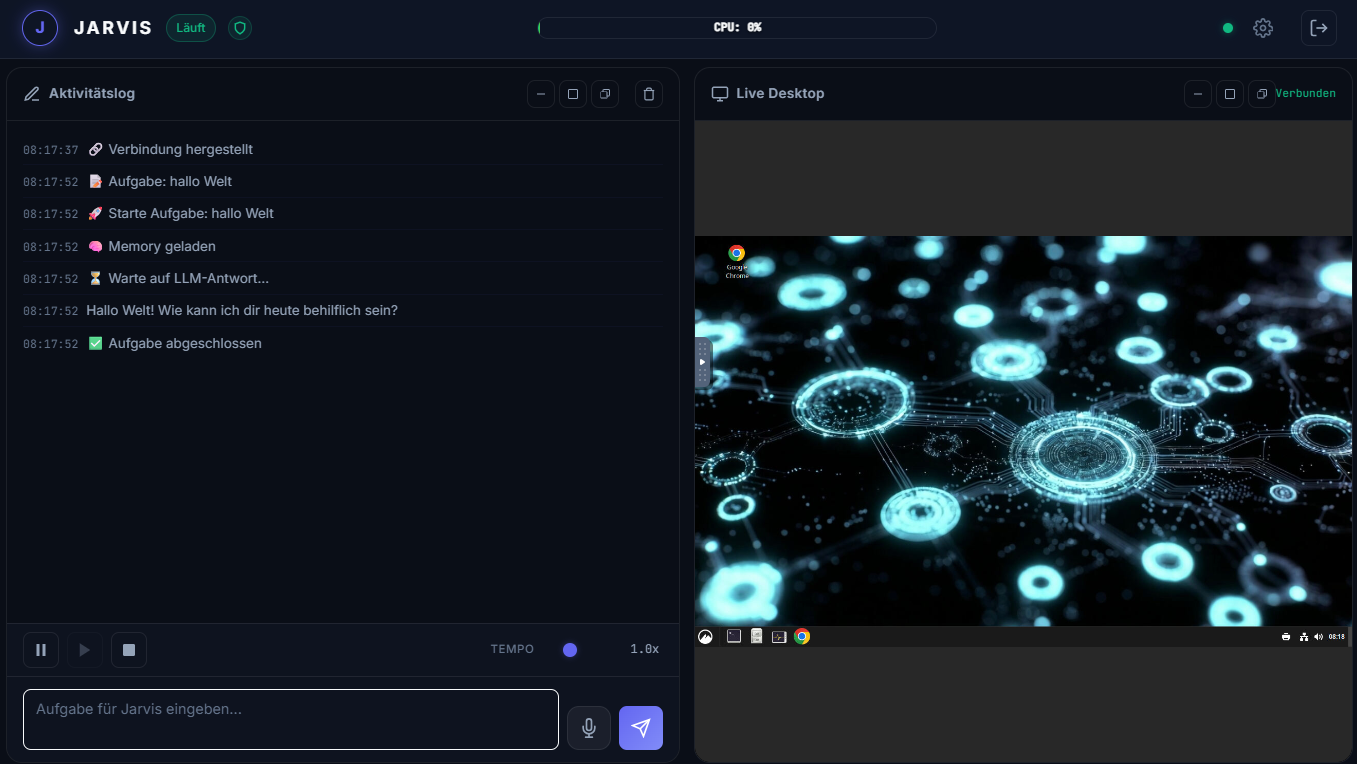
Steuert Maus, Tastatur und Fenster direkt via X11/VNC. Jarvis sieht und bedient beliebige GUI-Anwendungen wie ein echter Benutzer.
Controls mouse, keyboard and windows directly via X11/VNC. Jarvis sees and operates any GUI application like a real user.
🤖
Multi-LLM Unterstützung
Multi-LLM Support
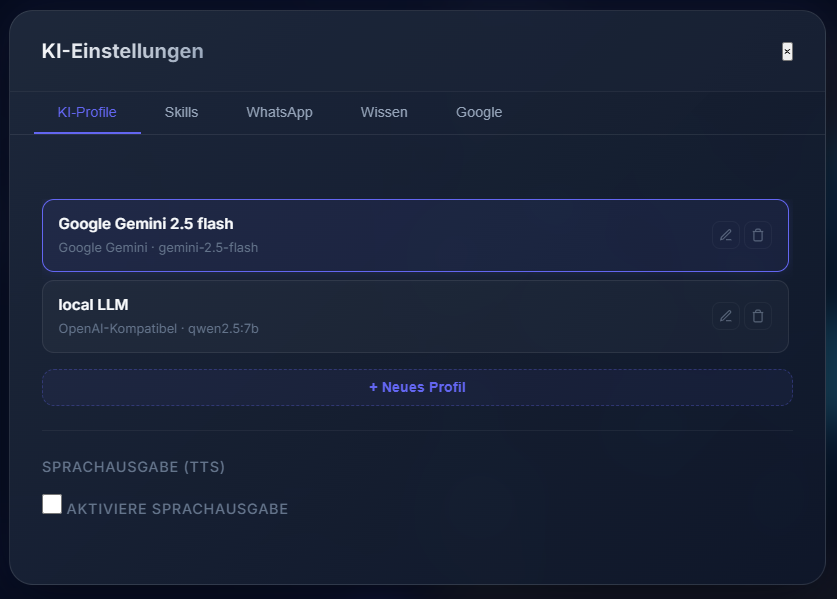
Gemini, Claude, OpenRouter, Ollama, LM Studio – und jedes weitere Modell mit OpenAI-kompatibler API. Kein Vendor-Lock-in.
Gemini, Claude, OpenRouter, Ollama, LM Studio – and any model with an OpenAI-compatible API. No vendor lock-in.
🔌
Skill-System
Skill System
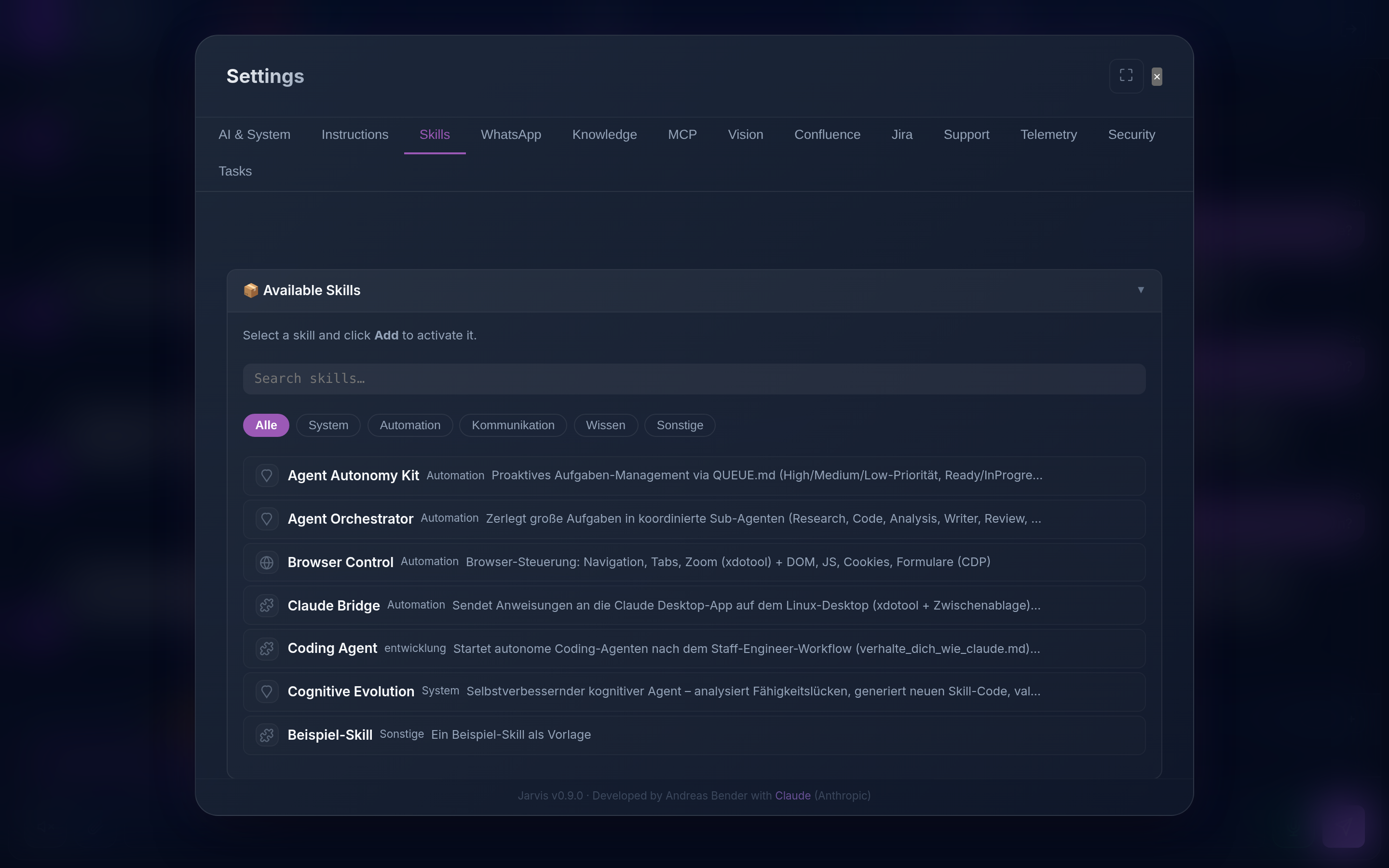
Erweiterbar durch Skills: Shell, Dateisystem, Browser-CDP, WhatsApp, Gmail, Google Drive – und viele mehr über OpenClaw.
Extendable via skills: Shell, filesystem, Browser-CDP, WhatsApp, Gmail, Google Drive – and many more via OpenClaw.
💬
WhatsApp-Integration
WhatsApp Integration
Sendet und empfängt WhatsApp-Nachrichten via Baileys. Sprachnachrichten werden automatisch per Whisper transkribiert.
Sends and receives WhatsApp messages via Baileys. Voice messages are auto-transcribed with Whisper.
🌐
Browser-Automatisierung
Browser Automation
Vollständige Browsersteuerung via xdotool (UI-Ebene) und Chrome DevTools Protocol (DOM-Ebene). Formulare ausfüllen, Seiten scrapen, JS ausführen.
Full browser control via xdotool (UI layer) and Chrome DevTools Protocol (DOM layer). Fill forms, scrape pages, execute JS.
🧠
Persistentes Gedächtnis + Auto-Learning
Persistent Memory + Auto-Learning
Jarvis merkt sich Präferenzen, Zugangsdaten und Projektzustand. Neu: Auto-Learning – wenn Jarvis mehrere Anläufe braucht, speichert er den erfolgreichen Weg automatisch. Beim nächsten Mal geht's direkt. Auch Benutzer-Korrekturen werden als Präferenzen gelernt.
Jarvis remembers preferences, credentials and project state. New: Auto-Learning – when Jarvis needs multiple attempts, it automatically saves the successful path. Next time, it goes direct. User corrections are also learned as preferences.
📝
Benutzer-Instruktionen
Custom Instructions
Gib dem KI-Agenten dauerhafte Anweisungen über Markdown-Dateien – direkt im Settings-Editor bearbeitbar. Kommunikationsstil, Sicherheitsregeln, projektspezifische Vorgaben – alles wird bei jedem Gespräch automatisch geladen.
Give the AI agent permanent instructions via Markdown files – editable directly in the Settings UI. Communication style, security rules, project-specific guidelines – everything is automatically loaded for every conversation.
📚
Wissensdatenbank (RAG)
Knowledge Base (RAG)
Eigene Dokumente (PDF, DOCX, TXT, Excel, PPTX, Bilder per OCR) durchsuchen – TF-IDF für kleine Bestände, automatischer Wechsel auf ChromaDB-Vektordatenbank bei wachsenden Datenmengen. Bilder werden per Tesseract-OCR gelesen und vom LLM aufbereitet. Bei PDFs mit beschädigter Textebene – typisch bei nachträglich verkleinerten Scans, wo aus 01.07. ein OL.O7. wird – erkennt Jarvis das und liest die betroffenen Seiten per Texterkennung neu; entschieden wird über eine Stichprobe, nicht geraten. Auch OneNote-Abschnitte (*.one) werden gelesen – ohne Cloud und ohne Microsoft-Konto: eingebunden wird die Windows-Freigabe, auf der die Notizbücher liegen, der Text kommt aus der Datei selbst. Genauso lassen sich ganze Netzlaufwerke (SMB/NFS/WebDAV) als Wissensquelle einhängen. RAG direkt auf deinen Daten, keine Cloud, kein Datenleck.
Search your own documents (PDF, DOCX, TXT, Excel, PPTX, images via OCR) – TF-IDF for small collections, automatic switch to ChromaDB vector database as data grows. Images are read via Tesseract OCR and refined by the LLM. For PDFs with a damaged text layer – typical for downsized scans, where 01/07 turns into OL/O7 – Jarvis detects it and re-reads the affected pages via OCR; the decision is made from a sample comparison, not guessed. OneNote sections (*.one) are read as well – no cloud, no Microsoft account: you mount the Windows share the notebooks live on, and the text comes out of the file itself. Whole network drives (SMB/NFS/WebDAV) can be mounted as a knowledge source the same way. RAG directly on your data, no cloud, no data leak.
📄
Office-Dokumente erstellen
Office Document Generation
Jarvis erstellt Word-, Excel- und PowerPoint-Dateien direkt im Chat – inklusive PDF-Export. Auch komplexe Inhalte wie Diagramme werden generiert; die fertige Datei kommt als Ein-Klick-Download zurück, nicht als bloßer Pfad. Präsentationen entstehen im Hausdesign: Farben, Schriften, Satzspiegel und Layouts kann Jarvis aus einer hochgeladenen Firmenvorlage übernehmen, statt im Office-Standard auszuliefern.
Jarvis creates Word, Excel and PowerPoint files directly in the chat – including PDF export. Even complex content like diagrams is generated; the finished file comes back as a one-click download, not just a path. Presentations are produced in your corporate design: Jarvis can take colours, fonts, margins and layouts from an uploaded company template instead of shipping the Office default.
🔗
Confluence & Jira
Confluence & Jira
Durchsucht Confluence-Seiten und Jira-Tickets read-only direkt im Chat – nach Relevanz sortiert, mit Quell-Links. Confluence-Seiten lassen sich zudem als Wissensquelle in die RAG-Datenbank importieren. Read-only: keine ungewollten Änderungen an deinen Systemen.
Searches Confluence pages and Jira tickets read-only directly in the chat – ranked by relevance, with source links. Confluence pages can also be imported into the RAG knowledge base. Read-only: no unintended changes to your systems.
🎧
Support-Portal & -Assistent
Support Portal & Assistant
Eigene Support-Oberfläche (/support & /portal): durchsucht Wissensdatenbank, Jira und Confluence gleichzeitig, sortiert nach Relevanz (%) und fasst per LLM zusammen – mit Quell-Links zum Original. Auch als externe Support-API (API-Key) für andere Anwendungen.
A dedicated support interface (/support & /portal): searches the knowledge base, Jira and Confluence simultaneously, ranked by relevance (%) and summarized by the LLM – with source links to the original. Also available as an external support API (API key) for other applications.
📦
Wissens-Export (JSON)
Knowledge Export (JSON)
Exportiere die komplette Wissensbasis als strukturiertes JSON (title/summary/facts/qa_pairs/content) – als eine Datei oder je eine JSON pro Dokument (ZIP). Optional per LLM angereichert oder inkl. Roh-Vektoren. So lässt sich dein Wissen in Fremdsysteme übernehmen.
Export the entire knowledge base as structured JSON (title/summary/facts/qa_pairs/content) – as a single file or one JSON per document (ZIP). Optionally LLM-enriched or including raw vectors. Take your knowledge into other systems.
🎨
Skin & White-Label
Skin & White-Label
Verpasse Jarvis dein eigenes Aussehen: Name, Farben und Logo der Oberfläche per Skill anpassen – ideal fürs Firmen-Branding. Dazu ein umschaltbares Hell-/Dunkel-Design. Alles zur Laufzeit und reversibel: Skill deaktivieren = zurück zum Standard-Design.
Give Jarvis your own look: customize the interface's name, colors and logo via a skill – ideal for company branding. Plus a switchable light/dark theme. All at runtime and reversible: disable the skill = back to the default design.
🎭
Multi-Agenten-Orchestrierung
Multi-Agent Orchestration
Komplexe Aufgaben auf mehrere spezialisierte Sub-Agenten aufteilen. Jeder Agent hat eigene Werkzeuge, Ziele und Ergebnisse – koordiniert über Dateisystem-Protokoll.
Split complex tasks across multiple specialized sub-agents. Each agent has its own tools, goals and results – coordinated via file-system protocol.
🔄
Einfaches Update
Easy Updates
Install-Skript erneut ausführen – fertig. Erkennt automatisch eine bestehende Installation und aktualisiert nur Code und Abhängigkeiten. Einstellungen und .env bleiben erhalten.
Just re-run the install script – done. Automatically detects an existing installation and only updates code and dependencies. Settings and .env are preserved.
🔌
MCP-Anbindung
MCP Integration
Externe Tool-Server per Model Context Protocol (MCP) anbinden – stdio, Streamable HTTP oder SSE. Hunderte verfügbare MCP-Server für Dateisysteme, Datenbanken und APIs, direkt als Agent-Tools nutzbar. Weil ein MCP-Server fremder Code ist, läuft er auf Wunsch in einer Namespace-Sandbox und sieht das Verzeichnis des Dienstes nicht – weder Konfiguration noch Zugangsdaten; die Zugangsdaten des Systems werden ihm ohnehin nicht übergeben. Ob Netzwerk-Benutzer seine Werkzeuge benutzen dürfen, entscheidet ein Administrator je Server.
Connect external tool servers via Model Context Protocol (MCP) – stdio, Streamable HTTP or SSE. Hundreds of available MCP servers for filesystems, databases and APIs, usable directly as agent tools. Because an MCP server is third-party code, it can run in a namespace sandbox where it cannot see the service directory – neither configuration nor credentials; the system's own secrets are never passed to it anyway. Whether network users may use its tools is decided by an administrator per server.
📊
Telemetry & Tracing
Telemetry & Tracing
Integriertes Tracing für Agent-Runs, Tool-Aufrufe und LLM-Calls. Performance-Statistiken in Echtzeit – Antwortzeiten, Fehlerquoten, Tool-Nutzung auf einen Blick.
Built-in tracing for agent runs, tool calls and LLM calls. Real-time performance stats – response times, error rates, tool usage at a glance.
💬
Jarvis Chat – Mobile-First UI
Jarvis Chat – Mobile-First UI
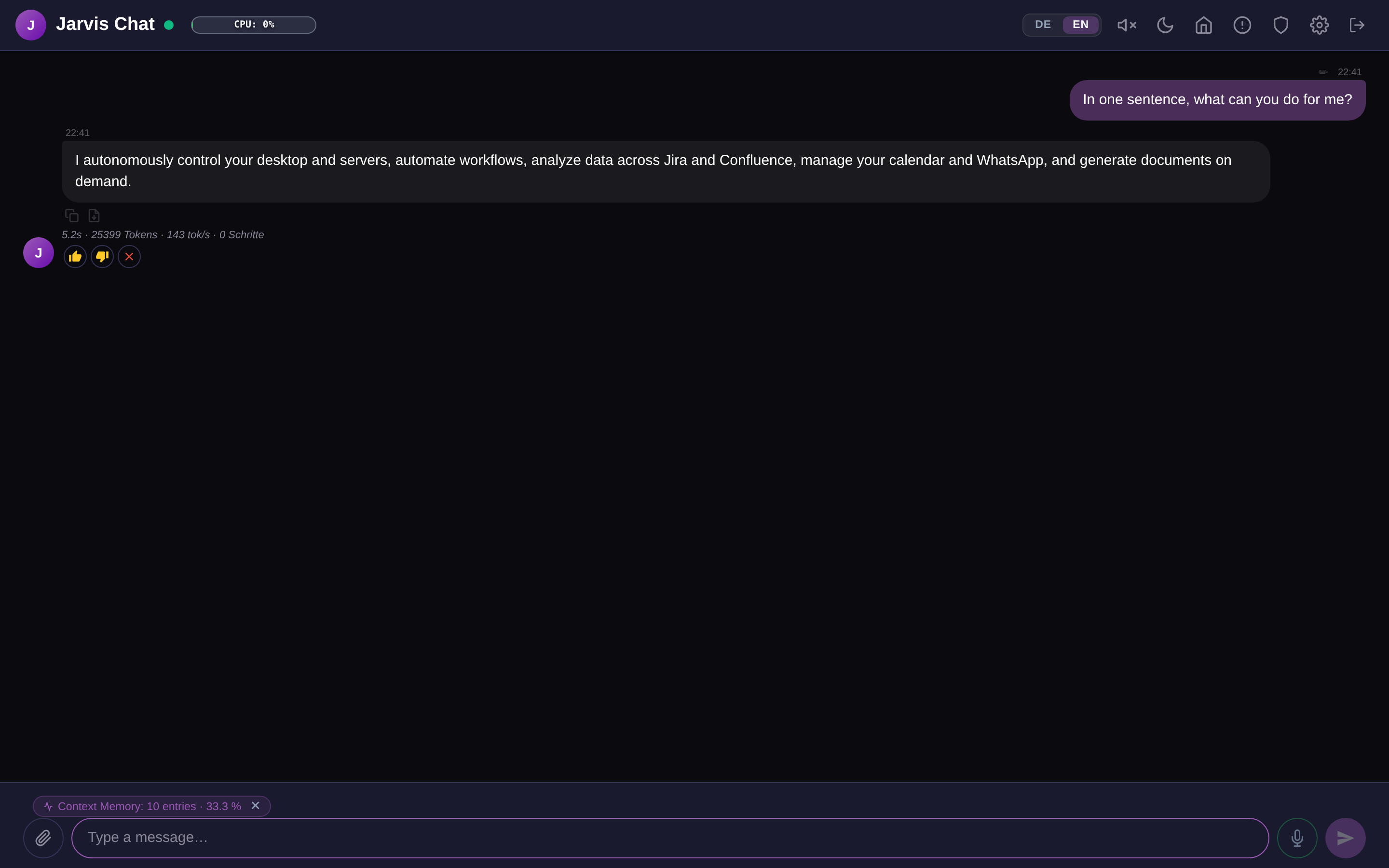
Dedizierte Chat-Oberfläche unter /chat – optimiert für Smartphones und Desktop. Hell/Dunkel-Modus, LDAP-Anmeldung, TOTP 2FA, SSL-Zertifikat-Assistent und nahtlose Konversationsführung. Ein Rechtsklick exportiert den kompletten Verlauf als PDF – mit Bildern, Diagrammen und Schaubildern, fest eingebettet, also auch beim Weitergeben vollständig.
Dedicated chat UI at /chat – optimized for smartphones and desktop. Light/dark mode, LDAP login, TOTP 2FA, SSL certificate wizard and seamless conversation flow. A right-click exports the entire conversation as a PDF – images, charts and diagrams included and embedded, so it stays complete when you pass it on.
🔐
Multi-User & LDAP-Sicherheit
Multi-User & LDAP Security
LDAP-Domain-Anmeldung mit granularer Berechtigungskontrolle. LDAP-Nutzer können chatten und Wissen abrufen, aber keine Shell-Befehle ausführen oder Dateien schreiben – volle Isolation ohne Konfigurationsaufwand.
LDAP domain login with granular permission control. LDAP users can chat and query knowledge, but cannot execute shell commands or write files – full isolation with zero configuration.
⏰
Cron-Trigger & Datei-Watcher
Cron Triggers & File Watchers
Jarvis arbeitet proaktiv: Cron-Jobs starten Agent-Tasks automatisch zu konfigurierbaren Zeiten. Datei-Watcher reagieren auf neue oder geänderte Dateien in überwachten Ordnern – mit Pattern-Matching und {filename}-Platzhaltern im Task-Text.
Jarvis works proactively: Cron jobs automatically trigger agent tasks at configured times. File watchers react to new or changed files in monitored folders – with pattern matching and {filename} placeholders in the task text.
📱
PWA + Telegram Bot
PWA + Telegram Bot
Jarvis Chat als installierbare App (PWA) auf iOS & Android – inkl. Offline-Cache und Push-Notifications. Dazu installierbarer Telegram-Bot-Skill: Nachrichten an den Bot werden als Jarvis-Tasks ausgeführt, Antworten kommen direkt zurück.
Jarvis Chat as an installable app (PWA) on iOS & Android – including offline cache and push notifications. Plus an installable Telegram Bot skill: messages to the bot are executed as Jarvis tasks, replies come straight back.
🔒
Audit-Log & User-Memory
Audit Log & Per-User Memory
Jede Tool-Ausführung wird strukturiert geloggt (Wer? Was? Wie lange?). Persistentes Gedächtnis pro Benutzer: jeder User hat seinen eigenen Memory-Namespace – keine Überschneidung zwischen Accounts.
Every tool execution is structured-logged (who? what? how long?). Persistent memory per user: each account has its own memory namespace – no overlap between users.
🧬
Selbstoptimierung & Code-Fixes
Self-Optimization & Code Fixes
Jarvis analysiert eigene Fehler in drei Phasen (Diagnose / Root Cause / Prävention) und schreibt strukturierte Lernberichte. Mit ausdrücklicher Benutzer-Freigabe passt er Instruktionen und Code-Level-Fixes eigenständig an – validiert durch eine zweite LLM-Instanz, bevor Änderungen angewendet werden.
Jarvis analyses its own errors in three phases (Diagnose / Root Cause / Prevention) and writes structured learning reports. With explicit user authorization it applies instruction updates and code-level fixes autonomously – validated by a second LLM instance before any change is written.
⭐
Proaktives Bewertungssystem & Selbstverbesserung
Proactive Rating System & Self-Improvement
Jarvis lernt von dir – nach jeder Antwort. Mit einem Klick auf 👍, 👎 oder ❌ gibst du direktes Feedback. Bei negativer Bewertung analysiert Jarvis seine Antwort automatisch mit einem zweiten LLM, generiert 3–5 konkret bessere Alternativen und leitet eine Lernregel ab, die dauerhaft in die Wissensbasis einfliesst. Keine manuelle Konfiguration – echte Verbesserung durch echtes Feedback. Verfügbar in Web-Chat, Android-App, iOS-PWA und Windows-App.
Jarvis learns from you – after every single answer. One tap on 👍, 👎 or ❌ sends instant feedback. On negative ratings, Jarvis automatically analyses its response with a second LLM, generates 3–5 concretely better alternatives and derives a learning rule that permanently feeds into the knowledge base. No manual configuration – real improvement from real feedback. Available in Web Chat, Android App, iOS PWA and Windows App.